Searching the CV Bank
The CV Bank lists every candidate your company has uploaded. Use the search box and filters to find people.
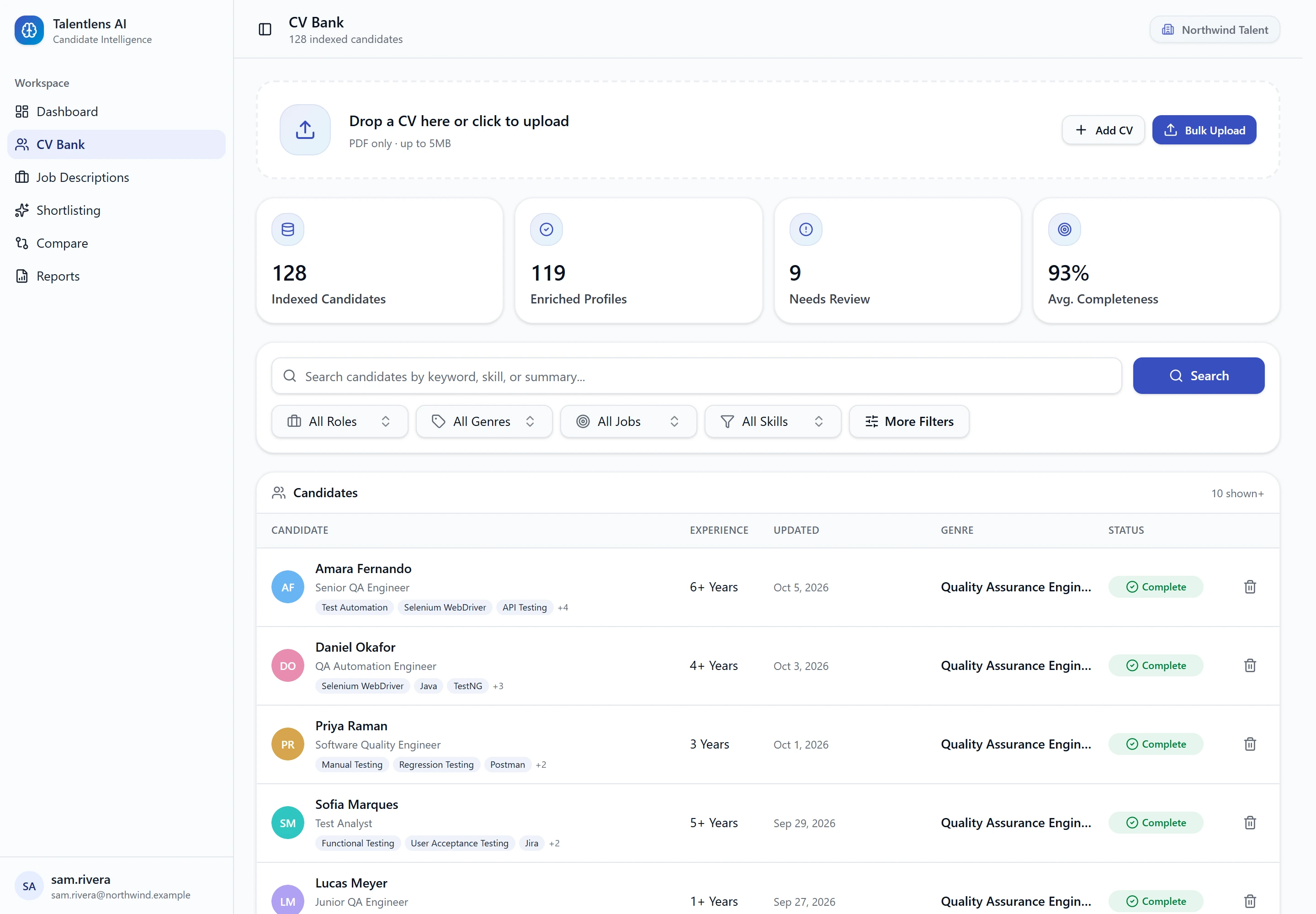
The numbers at the top
| Number | Meaning |
|---|---|
| Indexed Candidates | How many candidates are in your CV Bank |
| Enriched Profiles | Profiles whose details were filled in successfully |
| Needs Review | Profiles with one or more details a person should check |
| Avg. Completeness | How complete your profiles are, on average |
Search by meaning
Type into Search candidates by keyword, skill, or summary... and select Search to search across whole profiles. You can describe what you are looking for in your own words, for example "backend developer with payment experience". The search looks for candidates whose experience fits, not only for the exact words you typed.
Filters
Four filters sit under the search box:
| Filter | How it works |
|---|---|
| All Roles | Pick a current role |
| All Genres | Pick a professional area, such as Quality Assurance Engineer |
| All Jobs | Show only candidates who applied for a particular job |
| All Skills | Pick one or more skills. A candidate must have all of them |
These are searchable: open one and start typing.
Select More Filters for the rest:
| Filter | How it works |
|---|---|
| Candidate Name | Type the start of any part of a name |
| Candidate Email | Type any part of an email address |
| Experience Range (Years) | Set a Min, a Max, or both |
| Sort Candidates By | Order by experience or by upload date |
| Profile Enrichment Status | All, Enriched only or Needs review |
Searching by name
Each word you type must start one part of the candidate's name. Order does not matter, and the last word can be unfinished.
| You type | Finds |
|---|---|
Jane | Anyone with a name part starting "Jane" |
jane d | Jane Doe, but not other people whose surname is Doe |
smith j | John Smith, J. A. Smith |
Capital letters and punctuation are ignored.
Searching by email
Type the full address or any part of it, such as the part before the @ or the domain.
Clearing filters
The filters you have applied appear under Active Filters. Remove one by selecting its tag, or select Clear All to start again.
Reading the list
| Column | Meaning |
|---|---|
| Candidate | Name and current role |
| Experience | Total experience, for example "8 Months" or "3+ Years" |
| Updated | When the profile last changed |
| Genre | The candidate's professional area |
| Status | Complete, or Needs Review |
Select a candidate to open their profile.
Deleting a candidate
Select the bin icon at the end of the candidate's row, then confirm in the Delete Candidate Profile? box. This removes the profile, its match results and the original CV file, and cannot be undone.