Dashboard
The Dashboard is the first screen after you sign in. It summarises your company's hiring activity.
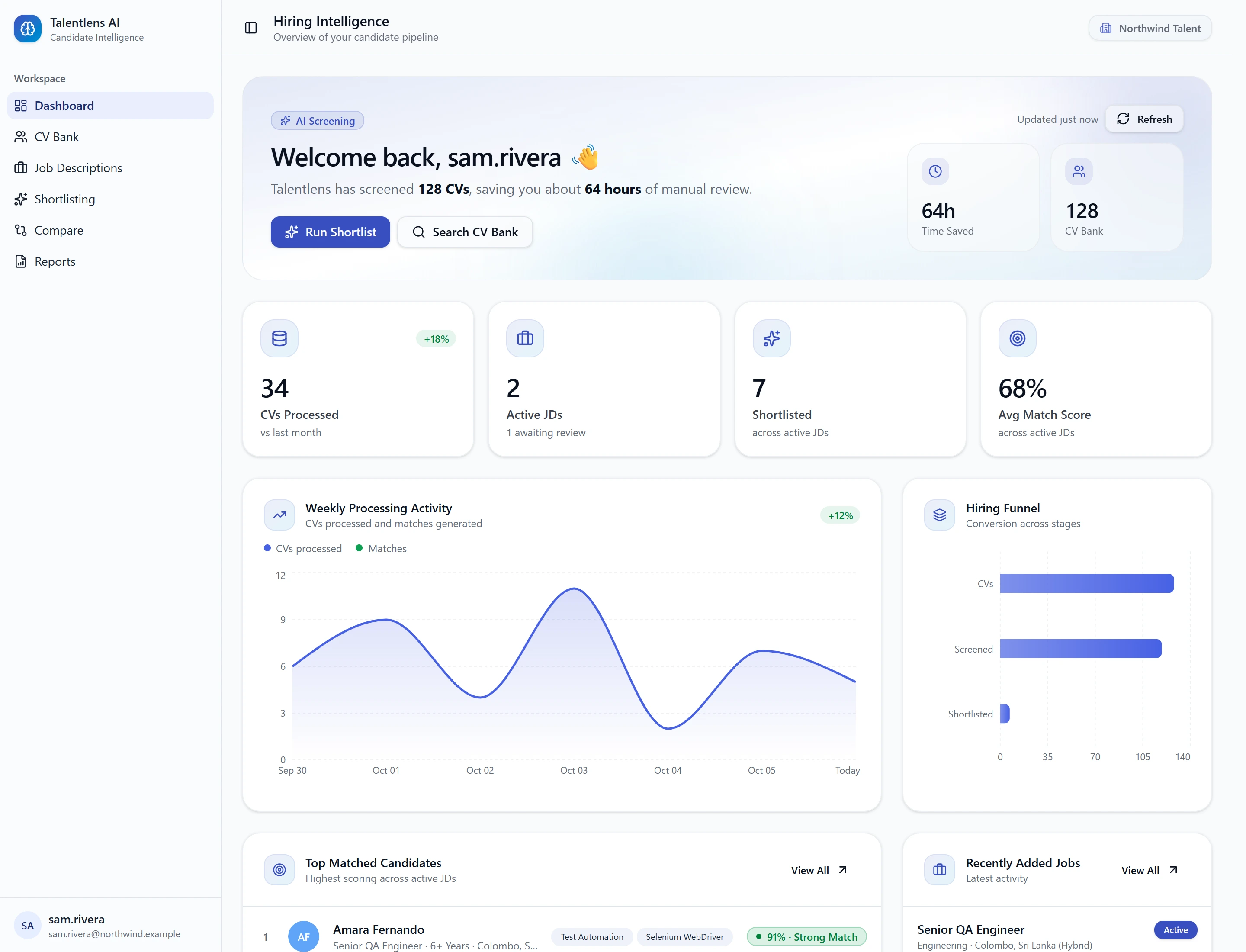
The headline numbers
| Number | Meaning |
|---|---|
| Time Saved | An estimate of screening time saved. It counts half an hour for each CV processed |
| CV Bank | How many candidates are in your CV Bank |
| CVs Processed | How many CVs have been processed |
| Active JDs | How many job descriptions are currently active |
| Shortlisted | How many candidates you have shortlisted |
| Avg Match Score | The average match score across your match results |
Time Saved is a rough guide, not a measurement.
The charts
| Chart | What it shows |
|---|---|
| Weekly Processing Activity | CVs processed and matches generated, week by week |
| Hiring Funnel | How many candidates reach each stage of your hiring process |
| Top Matched Candidates | The highest-scoring candidates across your active jobs |
| Recently Added Jobs | Your latest job descriptions |
Shortcuts
- Run Shortlist takes you to Shortlisting.
- Search CV Bank takes you to the CV Bank.
Keeping it current
The numbers refresh periodically, not instantly, so a change you just made may take a minute to appear. Select Refresh to update them now.