Reading the scores
Every candidate gets one overall match score, and a breakdown that shows where it came from. Select a candidate in the ranked list to see the breakdown on the right.
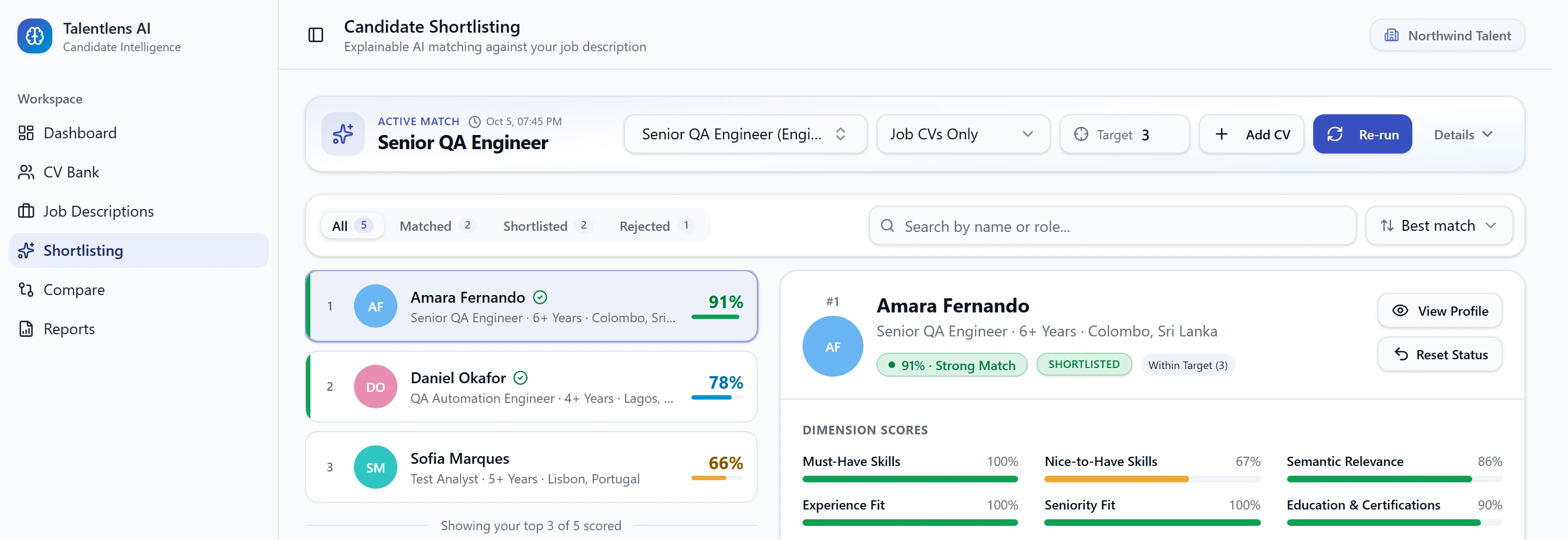
The overall score
The score is shown as a percentage with a label:
| Label | Score | How to read it |
|---|---|---|
| Strong Match | 80 and above | Meets the role closely |
| Good Match | 60 to 79 | Meets most of the role |
| Partial Match | 40 to 59 | Meets some of the role. Worth a look before deciding |
| Weak Match | Below 40 | Missing much of what the role asks for |
The six parts of a score
Under Dimension scores, the overall score is split into six parts. Each is scored separately.
| Part | What it measures |
|---|---|
| Must-Have Skills | How many of the role's essential skills the candidate has |
| Nice-to-Have Skills | How many of the role's optional skills the candidate has |
| Semantic Relevance | How well the candidate's whole profile fits the whole role, beyond individual skills |
| Experience Fit | The candidate's years of experience against the range the role asks for |
| Seniority Fit | The candidate's level against the level the role asks for |
| Education & Certifications | The candidate's degree and certifications against what the role asks for |
Each part has its own bar and percentage. In the evidence below the bars, each part also carries a label of its own, such as "Strong Match" or "Review Manually". Those describe that one part, not the candidate overall.
Must-have skills count the most. A part is left out when the job description does not ask for it. For example, if the job gives no seniority, Seniority Fit is not scored, and nobody gains or loses from it.
The evidence
Under AI explanation & evidence, each part shows what was found in the CV, for example how many must-have skills matched and which are missing, or the candidate's experience next to the requirement.
Anything the candidate lacks is listed under Missing Must-Have Requirements. A gap is always shown, so a good overall number never hides it.
A Needs review badge on a candidate means their profile has details that were not confirmed. Their score may change once the profile is corrected. See Candidate profiles.
You can check any of this against the CV: select View Profile, then View CV.
Related skills count
Skills are matched by meaning, not only by wording.
- Different ways of writing the same skill are treated as one skill. "ReactJS" and "React" match.
- A specific skill can satisfy a more general requirement. A candidate who lists a well-known API testing tool is credited for a role that asks for "API Testing", even if their CV never uses those words.
- It does not work the other way round. Knowing a general area does not count as knowing a specific tool within it.
When a skill is credited this way, it does not appear in the candidate's missing list.
Using the score well
- Treat Partial Match as a reason to look closer, not as a rejection.
- Read the missing must-haves before the number.
- If a score looks wrong, check the job description first. A must-have list that is too long or too vague pulls every score down.
- Scores for different jobs are not comparable with each other. A 75 for one role and an 80 for another do not mean the second candidate is better.